 Documentation · Reference · News
neurosurf is an R package for cortical surface data. It reads FreeSurfer, GIFTI, and AFNI/SUMA meshes, keeps vertex-wise values attached to their geometry, and turns them into publication figures and self-contained interactive HTML reports.
Status: Pre-release and not on CRAN. APIs may change.
Installation
Install a prebuilt binary from r-universe:
install.packages("neurosurf",
  repos = c("https://bbuchsbaum.r-universe.dev", "https://cloud.r-project.org")
)
or build the development version from GitHub (requires a C++ toolchain):
# install.packages("remotes")
remotes::install_github("bbuchsbaum/neurosurf")
Quick start
Render a thresholded map on both hemispheres of the bundled fsaverage5 surface, with sulcal depth as the anatomical underlay:
library(neurosurf)

surf <- load_fsaverage("fsaverage5", "inflated")
white <- load_fsaverage("fsaverage5", "white")
sulc <- load_fsaverage_sulc("fsaverage5")

# A synthetic z-map: smooth clusters centred in white-surface (x, y, z) space.
# Any numeric vector with one value per vertex works.
zmap <- function(g, side) {
  cluster <- function(centre, z, width = 12) {
    z * exp(-colSums((t(coords(g)) - centre)^2) / (2 * width^2))
  }
  cluster(c(45 * side, -60, 20), 4) + cluster(c(40 * side, 20, 30), 3) +
    cluster(c(55 * side, -20, 0), -3.5) + cluster(c(8 * side, 40, 10), -3)
}

fig <- surface_figure(
  lh = surf$lh, rh = surf$rh,
  values = list(lh = zmap(white$lh, -1), rh = zmap(white$rh, 1)),
  anatomy = sulc,
  threshold = 1.5, limits = c(-4, 4), legend_title = "z"
)
plot(fig)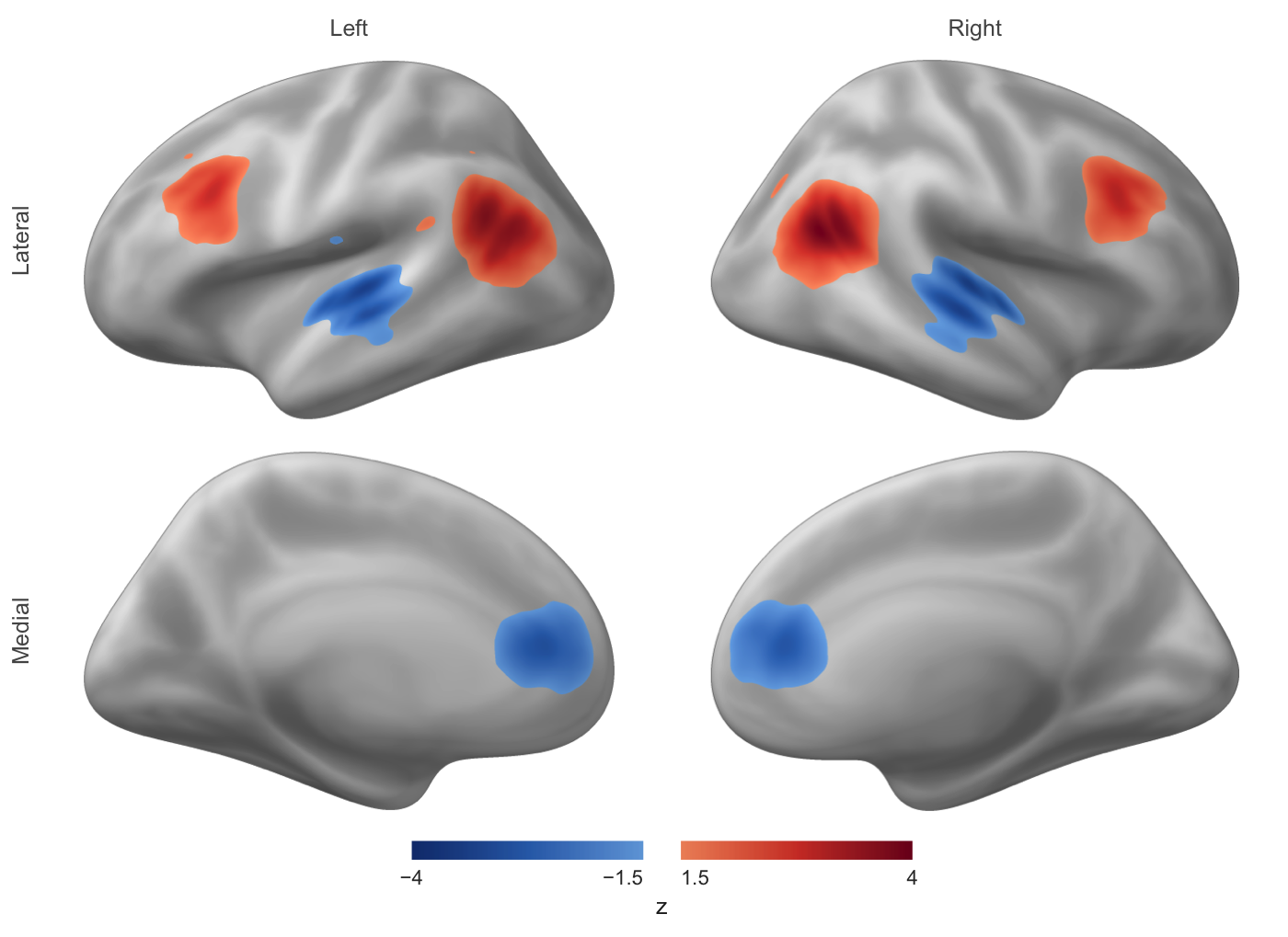
write_surface_figure(fig, "figure.png") saves the same figure. Rendering runs on the CPU, so it works identically on a laptop, a cluster node, or CI, with no OpenGL device or browser.
What it covers
-
Read and write surfaces and data: FreeSurfer, GIFTI, AFNI/SUMA, and NIML (
read_surf(),read_surf_geometry(),write_surf_data()), plus bundled fsaverage5 surfaces and sulcal depth (load_fsaverage(),load_fsaverage_sulc()). -
Map volumes to surfaces: sample a volumetric image onto a mesh with
vol_to_surf()orvol_to_surf_sdf(). - Analyse on the mesh: smoothing, curvature, geodesic distances, neighbourhood graphs, cluster thresholding, and ROI boundaries.
-
Surface searchlights for multivariate pattern analysis (
SurfaceSearchlight(),RandomSurfaceSearchlight()). -
Figures: lit, headless, deterministic multi-view figures with a shared colour scale (
surface_figure()), and interactive rgl display (view_surface()). -
Interactive reports: combine both hemispheres and several named maps in one
surface_scene(), show it withsurfwidget()in R Markdown or Quarto, or write it as a standalone HTML page withwrite_surface_scene(). The viewer is bundled, so reports need no CDN or network access.
Volumetric data structures come from neuroim2.
Documentation
- Introduction to neurosurf data structures: geometry, vertex data, and the core classes.
- Publication-quality surface figures: static figures for papers.
- Bilateral interactive surface reports: browser-based reports with several maps.
- Displaying surfaces with rgl: interactive exploration from an R session.
- Function reference.
Contributing
See CONTRIBUTING.md, including how to rebuild the bundled JavaScript viewer. Bug reports go to the issue tracker.