This vignette walks through the choices that matter once your data outgrow the defaults: which backend to pick, when to switch to a covariance-only fit, and how to project out-of-sample observations.
Backend selection
| Method | Best for | Pros | Cons |
|---|---|---|---|
eigen |
Small / medium dense problems | Robust reference behaviour | Can be expensive at scale; maxeig guards
dense eigendecomposition of a singular general metric; it never
truncates the metric |
spectra |
Few components with factorizable metrics | Usually applies a whitened operator | Dense data copy, factorization costs, and dense fallbacks |
randomized |
Wide (p >> n) low-rank
workloads |
Fast block GEMM / SpMM path | Approximation error depends on tuning |
deflation |
Few components, tight memory | Low memory footprint | Can converge slowly; monitor iteration warnings |
auto |
Automatic dispatch | Chooses a backend, including deflation when a singular metric exceeds the dense guard | Heuristics may not be optimal for every regime |
The default is "eigen"; pass
method = "auto" to let the heuristics pick a backend for
you on larger problems.
Backends on the same problem
Compare the dense reference with the randomized approximation on a full-rank noise matrix. Its slowly decaying spectrum makes approximation error visible. These single-run timings illustrate the calls; they are not a benchmark.
set.seed(11)
n <- 150; p <- 60
X <- matrix(rnorm(n * p), n, p)

t_eig <- system.time(
  fit_eig <- genpca(X, ncomp = 8, method = "eigen",
                    preproc = multivarious::center())
)
t_rnd <- system.time(
  fit_rnd <- genpca(X, ncomp = 8, method = "randomized",
                    preproc = multivarious::center())
)
data.frame(method = c("eigen", "randomized"),
           elapsed = c(t_eig["elapsed"], t_rnd["elapsed"]),
           top_sv  = c(fit_eig$sdev[1], fit_rnd$sdev[1]),
           max_relative_error = c(0, max(abs(fit_rnd$sdev / fit_eig$sdev - 1))))
#>       method elapsed   top_sv max_relative_error
#> 1      eigen   0.110 19.48896          0.0000000
#> 2 randomized   0.008 19.26370          0.0301751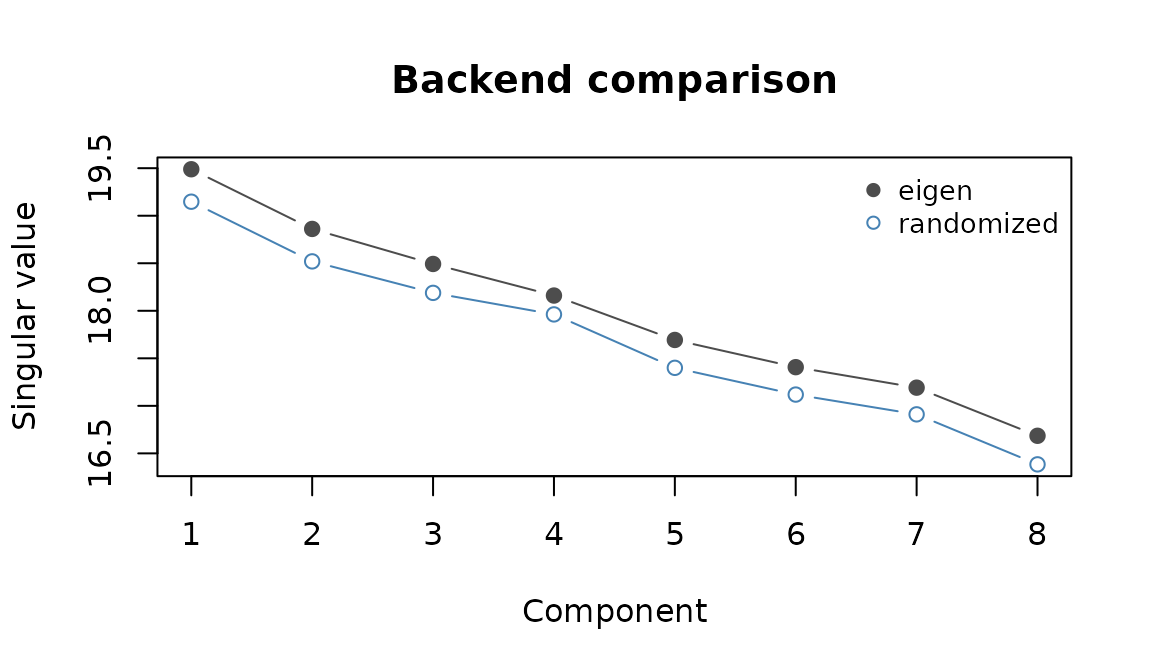
The randomized approximation underestimates the reference singular values on this full-rank example. The table reports the largest relative difference.
The maximum relative difference here is 3.02%. Increase
oversample, n_power, or n_polish
when you need a more accurate approximation, then check the accuracy and
time on a representative problem.
Sparse workflow (spectra)
The spectra backend factors each metric once (a sparse
Cholesky here) and runs eigencore’s iterative partial SVD on the
whitened operator; this is useful when few components are needed and the
data copy and metric factors fit in memory:
set.seed(42)
n <- 300; p <- 200
X_sparse <- rsparsematrix(n, p, density = 0.01)

# Sparse tridiagonal row/column metrics (mild AR(1)-style coupling)
M_sp <- bandSparse(n, k = c(-1, 0, 1),
                   diagonals = list(rep(0.1, n - 1), rep(1, n), rep(0.1, n - 1)))
A_sp <- bandSparse(p, k = c(-1, 0, 1),
                   diagonals = list(rep(0.1, p - 1), rep(1, p), rep(0.1, p - 1)))

fit_sp <- genpca(X_sparse, M = M_sp, A = A_sp, ncomp = 5, method = "spectra",
                 preproc = multivarious::pass())
fit_sp$sdev
#> [1] 5.153523 4.533004 4.258609 4.174038 3.991699
What stays sparse
There are three separate storage costs: the data, the metrics or their factors, and the matrices used by the solver.
-
"deflation"can retain sparseX,M, andAand apply the residual implicitly. Use preprocessing that preserves sparsity, such aspass()here: ordinary centering generally fills implicit zeros. -
"spectra"and"randomized"make a dense copy ofX. Sparse input alone therefore does not bound their data storage by its nonzero count. - The eigen and spectra factorization paths handle diagonal metrics elementwise, dense positive definite metrics by dense Cholesky, and sparse positive definite metrics by sparse Cholesky. Sparse Cholesky can add many nonzeros: fill-in depends on graph structure and ordering.
- A singular general metric on the smaller side requires dense
eigendecomposition, refused above
maxeig(default 5000). It is never truncated to meet that limit. A singular large-side metric is used in products without being factored.method = "auto"can route an oversized singular small-side case to deflation. - Spectra usually applies the whitened operator without forming it,
but can materialize it for a dense fallback. Its singular large-side
route forms a smaller Gram matrix. The randomized method instead works
with projected blocks and metric products;
maxeigis not its workspace guard.
Metric validation can itself require a sparse Cholesky probe. Banded metrics such as those above have favourable fill-in; an arbitrary spatial graph need not. Budget for the factors and possible dense workspaces as well as the original sparse inputs.
Covariance-only GPCA
When you already have the cross-product C = X' M X,
genpca_cov() avoids touching the full data matrix:
set.seed(123)
n <- 100; p <- 15
X <- matrix(rnorm(n * p), n, p)
M <- diag(runif(n, 0.8, 1.2))
A <- diag(runif(p, 0.7, 1.3))
C <- t(X) %*% M %*% X
fit_cov <- genpca_cov(C, R = A, ncomp = 5, method = "gmd")
fit_cov$d
#> [1] 13.80217 12.42550 11.92054 11.15895 10.96560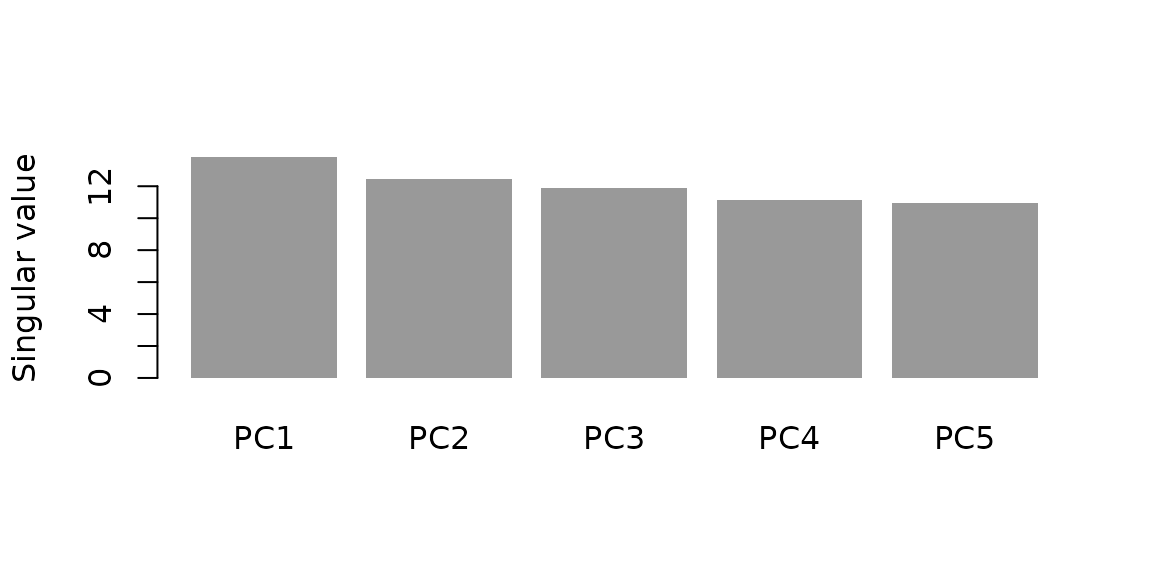
Singular values from the covariance-only fit.
Out-of-sample projection
Fit on training rows, then project held-out observations into the same component space:
set.seed(7)
X <- matrix(rnorm(200 * 30), 200, 30)
fit <- genpca(X[1:150, ], ncomp = 4,
              preproc = multivarious::center())
scores_test <- multivarious::project(fit, X[151:200, ])
head(scores_test, 4)
#>            PC1        PC2        PC3        PC4
#> [1,] 1.9323426  0.4080526  0.1924407  0.6673048
#> [2,] 0.3498745 -0.6490485 -0.2579339 -0.9996621
#> [3,] 0.9590113 -0.9305126  1.4603670  1.1496702
#> [4,] 0.1125973 -1.0845757  0.2493420  1.2509707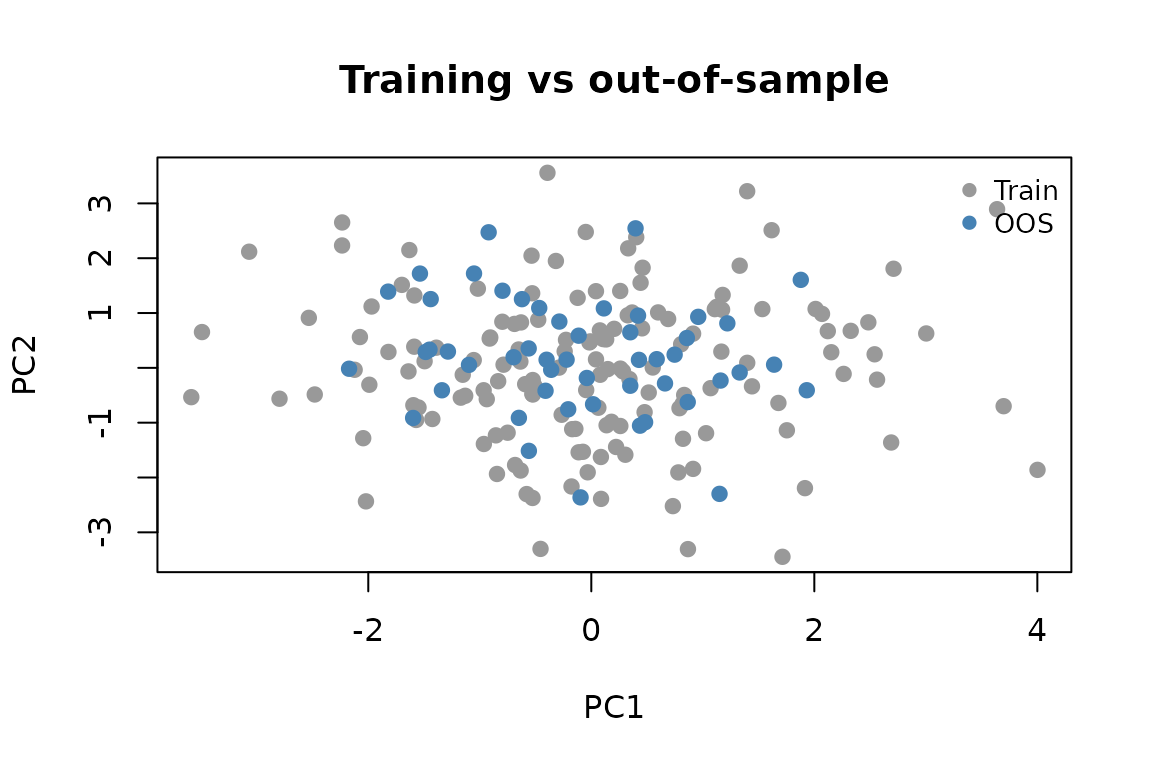
Training scores (grey) and out-of-sample scores (blue) projected into the same component space.
Performance tips
Choose preprocessing for the analysis first, then budget its storage:
a centered sparse matrix can become dense. If a metric needs repair, use
repair_metric() once and inspect its report before fitting.
Limit ncomp to the components you intend to use, and
consider the covariance route when n is large but
p is moderate.
Where next
See GPCA Metrics for building metrics, and Getting Started for a getting-started walkthrough.